At Techsila, we empower businesses to thrive in the digital age with innovative, high-impact technology solutions designed for scale, speed, and security.

Get In Touch

Quick Email

info@techsila.io

Local Guide Chrome Extension

  • Home |
  • Local Guide Chrome Extension

About Project

The Google Maps Local Guide Chrome Extension is a powerful tool designed to enhance the experience of Google’s Local Guides by automating submissions, reporting reviews to Google Maps, and providing real-time insights into their contributions. Developed by Techsila, this Chrome Extension seamlessly integrates with Google Maps to streamline the submission process, track submission status, and offer detailed analytics on user contributions.

By providing a structured view of contributions, interactive charts, and a user-friendly dashboard, this Chrome Extension enables Local Guides to gain better visibility into their activity, optimize their engagement, and track the status of their submissions effortlessly. The Chrome Extension ensures a smooth and efficient experience while maintaining security and ease of use.

Local Guide Chrome Extension

Problem Statement

Google’s Local Guides contribute valuable information through reviews, photos, and edits on Google Maps. However, they lack a dedicated tool to efficiently track, automate and analyze their contributions in real time. Without a structured view of their activity, Local Guides face several challenges:

Limited Visibility: No centralized dashboard to track points, submissions, and reviews in an organized manner.

Lack of Automation: No built-in tools to streamline the submission process, requiring manual effort for each contribution.

Manual Tracking Issues: Users must navigate through multiple Google Maps pages to review their past contributions.

Lack of Data Insights: No analytical tools to visualize submission trends, making it difficult for guides to assess their engagement over time.

To address these challenges, Techsila developed the Google Maps Local Guide Chrome Extension

A streamlined solution that automates the submission process, provides real-time data tracking, offers submission analytics, and enhances user controls, ensuring Local Guides can monitor and optimize their contributions effortlessly.

Challenges

The development of the Local Guide Chrome Extension presented several technical hurdles. Since Google Maps operates on a dynamic DOM structure that frequently changes, ensuring stable automation required carefully crafted selectors and Puppeteer-driven intelligent waits to handle asynchronous content loading. Another challenge was building an automation workflow that streamlined submissions without breaching compliance or appearing as bot-like behavior. Handling real-time data processing was equally complex, as the system needed to continuously fetch, cache, and update user contributions without slowing down performance. Beyond the backend logic, the team also faced the task of transforming complex datasets into intuitive visuals. Designing a dashboard that offered clear insights into submissions, points, and trends—while still being lightweight and responsive—required balancing functionality with usability. Finally, ensuring secure cookie handling, token management, and compliance with Chrome Web Store policies was critical to maintain user trust and data privacy throughout the entire process.

Solution and Implementation

To address the challenges faced by Google’s Local Guides, Techsila developed the Google Maps Local Guide Chrome Extension, providing a seamless, data-driven solution that enhances visibility, automation, tracking, and analytics for user contributions.

Solution Overview

The Chrome Extension offers a centralized dashboard where Local Guides can:

✔ Automate Submissions – Streamline the process of submitting edits and reporting reviews to Google Maps.
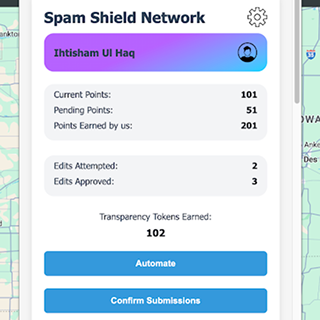
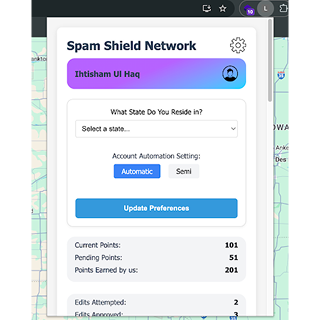
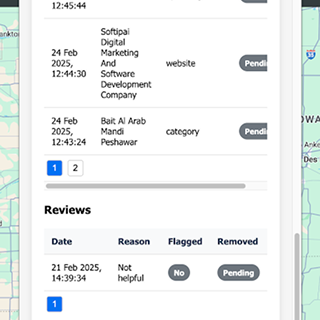
✔ Track Profile Insights – View their name, accumulated points, and overall progress.

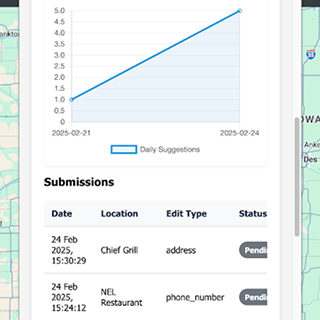
✔ Monitor Contributions – Access a detailed table of submissions and an interactive chart showing daily submission trends.

✔ Review Reported Content – Easily browse a structured list of reported reviews.

✔ Manage Preferences – Update their residing state.

secure and optimized Chrome extension for Google Maps data reporting
automated review submission panel for Google Maps Local Guides
local guide profile page with points, state, and reported reviews
minimalist Chrome extension UI with user-friendly settings panel
secure and optimized Chrome extension for Google Maps data reporting

Implementation Strategy

🔹 Chrome Extension Development

Built a lightweight yet feature-rich Chrome Extension that integrates seamlessly with Google Maps.

Utilized secure cookie access to personalize user data without compromising privacy.

🔹 Automation & Optimization

Developed a submission automation system to streamline user contributions with minimal manual effort.

Implemented advanced caching and lazy loading to enhance performance.

🔹 Data Processing & Visualization

Designed a real-time tracking system to fetch and display user contributions dynamically.

Implemented interactive charts to visualize submission trends for better insights.

🔹 Performance & Optimization

Developed custom plugins to optimize speed, ensuring smooth user experience.

Implemented advanced caching and lazy loading to enhance performance.

🔹 User-Friendly Interface

Created a minimalist yet powerful UI, ensuring ease of navigation and accessibility.

Integrated a hidden preferences panel, accessible via a settings icon for seamless account customization.

🔹 Security & Compliance

Ensured secure authentication and user data protection following best industry practices.

Maintained Google Chrome Extension compliance for smooth approval and distribution.

Business Impact

The launch of the Local Guide Chrome Extension had a significant impact on both user experience and platform credibility. By automating submissions and reporting workflows, Local Guides were able to reduce manual effort dramatically, contributing more efficiently to Google Maps. The addition of real-time analytics and interactive dashboards increased user engagement, giving contributors a clear understanding of their activity trends and helping them stay consistent in their efforts. This not only enhanced the productivity of individual Local Guides but also improved the overall quality and volume of community contributions, making Google Maps richer and more accurate. On the technical side, the extension’s modular, performance-optimized design ensured that new features could be added with minimal refactoring, providing long-term scalability. For Techsila, delivering a secure, high-performance Chrome extension further strengthened its reputation in automation, data visualization, and custom extension development, positioning the company as a trusted technology partner for SaaS and data-driven solutions.

Team Involved

Ihtisham Ul Haq
Ihtisham Ul Haq
Mern Stack Developer

Key Tools & Platforms Used

Outcome

  • The Google Maps Local Guide Chrome Extension successfully enhances tracking, reporting, and customization for Local Guides, enabling them to analyze contributions, optimize engagement, and personalize their experience—all within a single, easy-to-use platform.