

The way we write code has completely changed, and in 2026, speed is everything. Deadlines are tighter, products are more complex, and users expect updates faster than ever. That’s exactly why the best AI code editors for faster development in 2026 are no longer optional tools, they’re a competitive advantage. Think about it. Developers today aren’t just typing code; they’re reviewing pull requests, fixing bugs, refactoring legacy files, and switching between multiple frameworks. Doing all of this manually slows teams down. AI code editors step in to handle the repetitive work, suggesting smarter code, catching errors early, and even helping with complex logic, so developers can focus on building better products, not fighting their editor.
From solo developers to fast-scaling SaaS teams, everyone is turning to AI-powered editors to write cleaner code, reduce development time, and ship features faster. But with so many tools claiming to be “AI-powered,” choosing the right one can be confusing. That’s why we’ve put together this curated guide, a list of the 15 best AI code editors for faster development in 2026. Each tool in this list is selected based on real-world usefulness, modern AI capabilities, and how well it fits today’s development workflows.
If your goal is to code faster, make fewer mistakes, and stay ahead in 2026, you’re in the right place.
What Makes an AI Code Editor Truly Powerful in 2026
Not every tool that adds “AI” to its name actually helps developers work faster. In 2026, the gap between basic autocomplete editors and truly intelligent AI code editors is massive. The best tools don’t just assist with code, they think with the developer.
So what actually separates the best AI code editors for faster development in 2026 from the rest? Let’s break it down in simple terms.
1. Context Awareness Across the Entire Codebase
In 2026, AI code editors are expected to understand more than just the current file.
A powerful AI editor should:
-
Understand relationships between files and components
-
Follow project structure and architecture
-
Respect existing patterns and conventions
Instead of suggesting random snippets, modern AI editors analyze your entire codebase before making recommendations. This means fewer bugs, cleaner logic, and code that actually fits your project, not just compiles.
2. Smarter Code Generation (Not Just Autocomplete)
Old-school autocomplete saves keystrokes. AI code editors save time and mental energy.
The best tools in 2026 can:
-
Generate complete functions and components
-
Convert plain language into working code
-
Suggest optimized logic instead of verbose solutions
This allows developers to move faster without sacrificing quality, especially when building features under tight deadlines.
3. Built-In Debugging and Error Detection
One of the biggest time-wasters in development is debugging. Advanced AI code editors now act like a second pair of eyes.
They help by:
-
Detecting potential bugs before runtime
-
Explaining why errors occur
-
Suggesting fixes in plain language
Instead of jumping between logs, forums, and documentation, developers can resolve issues directly inside the editor saving hours every week.
4. Support for Modern Tech Stacks
A truly powerful AI code editor in 2026 must work seamlessly with:
-
Frontend frameworks
-
Backend services
-
APIs and databases
-
Cloud-native architectures
The best editors adapt to how modern software is built today, not how it was built five years ago. This flexibility is critical for SaaS teams and fast-moving startups.
5. Speed Without Losing Control
Speed is important, but control matters more.
Top AI code editors:
-
Let developers review and refine AI suggestions
-
Avoid overwriting logic without permission
-
Enhance productivity without creating dependency
The goal isn’t to replace developers, it’s to amplify their expertise.
Why This Matters Before Choosing Any Tool
Understanding these core features helps you avoid flashy tools that promise a lot but deliver little. When you know what truly matters, choosing the right AI code editor becomes much easier, and your development workflow becomes faster, cleaner, and more reliable.
Key Features to Look for in AI Code Editors
Not all AI code editors are created equal. If you want a tool that truly boosts productivity and speeds up development, there are certain features you can’t compromise on. Here’s what top editors in 2026 are offering:
-
Smart Code Completion:
AI editors don’t just auto-complete syntax; they predict your logic and suggest entire code blocks. This saves hours, especially in complex frameworks like React, Angular, or Node.js. Tools with context-aware suggestions reduce errors and let you focus on solving problems instead of debugging. -
Error Detection & Fix Suggestions:
Modern AI editors actively highlight potential bugs, security vulnerabilities, or coding inefficiencies. For example, if your SaaS app is using outdated encryption practices, a smart editor can alert you early.Ensure your applications are not only fast but fully secure—partner with Techsila’s expert team through our Web Security & Penetration Testing Service and protect your code like a pro.” -
Seamless Integration with Version Control:
Collaboration is easier when your AI editor works smoothly with Git, GitHub, or GitLab. Teams can merge code, review pull requests, and even get AI-driven suggestions on commit messages, reducing manual overhead. -
Framework & Language Support:
The best AI code editors adapt to multiple languages and frameworks, from Python and JavaScript to modern SaaS stacks. The broader the support, the more versatile the tool is for your projects. -
Documentation & Learning Assistance:
Some AI editors offer inline documentation, examples, and tutorials while you code. This is invaluable for onboarding new developers or quickly learning new APIs.
Pro Tip: To accelerate your front-end projects, you can hire expert React developers who are already familiar with AI-assisted workflows. Check out Techsila’s React JS Development service . Our team will help you get up and running faster with modern coding practices.
For more industry insights on AI code editors, this external article by TechRepublic gives a comprehensive breakdown of features that matter in 2026.
Top Features to Look for in AI Code Editors
Choosing an AI code editor isn’t just about picking the trendiest tool. The best AI code editors for faster development in 2026 come packed with features that actually boost productivity, reduce errors, and streamline workflows. Let’s dive into what makes these tools indispensable:
1. Smart Code Autocompletion
AI-powered autocompletion goes beyond just filling in brackets or function names. Modern editors predict complex code structures, suggest better algorithms, and even offer context-aware solutions based on your project. For example, AI can recommend the most efficient way to query a database or optimize a loop for performance.
This feature alone can save hours of repetitive coding, allowing developers to focus on creative and critical thinking rather than mundane typing.
2. Real-Time Error Detection and Debugging
One of the most time-consuming parts of development is hunting down bugs. AI editors can detect errors in real-time, sometimes before you even run the code. They not only highlight syntax mistakes but also suggest fixes, which drastically reduces debugging time.
For teams working on SaaS projects, this feature is a game-changer. It ensures code quality remains high, even when multiple developers are contributing simultaneously. For a hands-on guide to maintaining high-quality SaaS code, check out Techsila’s React.js development services. Our expert team helps developers integrate best practices into AI-assisted workflows.
3. AI-Assisted Refactoring
Refactoring code is essential for long-term maintainability, but it’s tedious. AI editors analyze your entire codebase and suggest smarter, cleaner ways to organize code. Whether it’s renaming variables, extracting methods, or optimizing loops, AI can automate repetitive refactoring tasks and improve performance.
4. Natural Language to Code
Some advanced AI editors let you type instructions in plain English, and the AI converts them into actual code. For example, you could type:
“Create a function that fetches all active users from the database and sorts them by signup date.”
and the AI generates a working function in your preferred language.
This feature is especially useful for junior developers or cross-functional teams where coding expertise varies.
5. Integration with Version Control
Collaboration is key to fast development. The best AI code editors integrate seamlessly with tools like GitHub, GitLab, or Bitbucket, suggesting pull request improvements, highlighting merge conflicts, and even recommending commit messages. This ensures teams spend less time managing repositories and more time shipping features quickly.
6. Code Snippet Libraries
AI editors often come with pre-built, reusable code snippets, which can drastically speed up development. Imagine having a library of secure authentication modules, database connection functions, or responsive UI templates ready to use. This not only saves time but also ensures best practices are applied consistently across projects.
7. Cross-Language Support
Modern SaaS products often use multiple programming languages across frontend, backend, and cloud environments. The best AI code editors understand multiple languages and frameworks, providing smart suggestions across your entire tech stack, whether it’s React.js, Node.js, Python, or Go. Teams looking to scale quickly will benefit from AI that can bridge language gaps, making it easier for developers to work across different modules.
8. Security and Compliance Suggestions
Security is no longer optional. Modern AI code editors can flag insecure code patterns, detect potential vulnerabilities, and suggest industry-compliant alternatives in real time. For SaaS companies, this ensures your applications stay safe and compliant without slowing down development. Protect your software and streamline secure coding by partnering with Techsila’s Cybersecurity Services team, we provide hands-on guidance to implement secure, AI-driven coding workflows that keep your projects fast, reliable, and compliant.
Pro Tip: While these features sound amazing individually, the real productivity boost comes when an AI editor combines autocompletion, debugging, and security suggestions seamlessly. That’s the mark of a tool built for 2026 fast-paced SaaS development.
Top 15 AI Code Editors for Faster Development in 2026
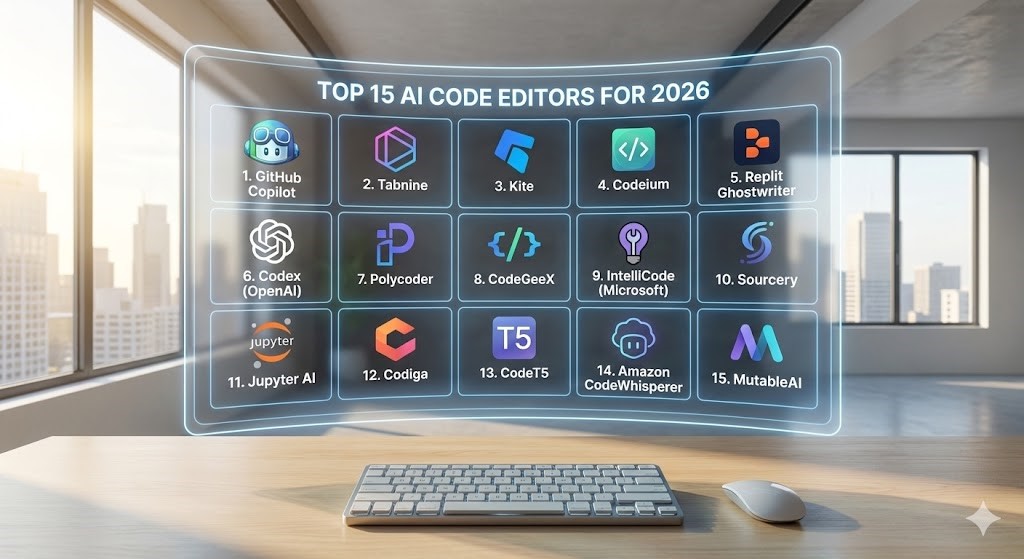
Choosing the right AI code editor can feel overwhelming with so many options promising “smarter coding” and “faster development.” To help you cut through the noise, here’s a curated list of the 15 best AI code editors for faster development in 2026, including what makes each one stand out, so you can pick the right fit for your workflow.
1. GitHub Copilot
Why it’s powerful: GitHub Copilot uses advanced AI to suggest entire lines or blocks of code as you type. It supports multiple languages and integrates seamlessly with Visual Studio Code.
Best for: Developers who want predictive code suggestions in real time.
Pro tip: Pair it with your existing React or Node projects for a significant boost in coding speed.
2. Tabnine
Why it’s powerful: Tabnine provides AI-driven autocompletion across multiple IDEs. It’s trained on billions of lines of code, making its suggestions surprisingly accurate.
Best for: Teams looking for cross-language support and enterprise-level customization.
3. Kite
Why it’s powerful: Kite predicts your next code segments and offers documentation instantly. Its Python support is unmatched, and it integrates with VS Code, JetBrains, and Sublime Text.
Best for: Python-heavy SaaS projects where speed matters.
Need AI-assisted SaaS coding that scales? Techsila’s React JS Development team can integrate tools like Kite to boost productivity and reduce errors.
4. Codeium
Why it’s powerful: Codeium offers free AI autocompletion for multiple languages, with a focus on enhancing productivity without slowing down your IDE.
Best for: Developers looking for a lightweight yet smart AI assistant.
5. Replit Ghostwriter
Why it’s powerful: Replit’s Ghostwriter assists in live coding, debugging, and even generating entire functions.
Best for: New SaaS startups or solo developers seeking real-time coding help.
6. Codex (OpenAI)
Why it’s powerful: Codex, the AI behind GitHub Copilot, can understand natural language instructions and convert them into code.
Best for: Teams looking for robust AI coding across multiple frameworks.
7. Polycoder
Why it’s powerful: Polycoder specializes in generating C code using AI, perfect for low-level system programming.
Best for: Developers working on SaaS tools requiring optimized, low-level code.
8. CodeGeeX
Why it’s powerful: CodeGeeX focuses on multilingual AI-assisted coding, supporting over 20 programming languages.
Best for: SaaS teams building internationalized applications.
9. IntelliCode (Microsoft)
Why it’s powerful: IntelliCode learns from your coding patterns and provides context-aware suggestions in Visual Studio.
Best for: Enterprise-level developers using Microsoft ecosystems.
Looking for AI-driven development that scales? Our team can help integrate IntelliCode and other smart tools for enterprise SaaS projects. Web Security & Penetration Testing
10. Sourcery
Why it’s powerful: Sourcery automatically refactors Python code for readability and efficiency.
Best for: Python-heavy SaaS teams who want to maintain clean code.
11. Jupyter AI
Why it’s powerful: Adds AI-powered code suggestions and natural language queries directly in Jupyter Notebooks.
Best for: Data scientists and SaaS projects requiring heavy computational workflows.
12. Codiga
Why it’s powerful: Codiga detects vulnerabilities, suggests code improvements, and maintains coding standards automatically.
Best for: SaaS teams focused on secure and maintainable code.
13. CodeT5
Why it’s powerful: A transformer-based AI code generator that excels at translating and generating code snippets.
Best for: Teams working with multiple programming languages and frameworks.
14. Amazon CodeWhisperer
Why it’s powerful: AWS’s AI code companion provides code recommendations and security analysis.
Best for: SaaS projects built on Amazon Web Services.
15. MutableAI
Why it’s powerful: MutableAI predicts your code intentions and helps you write faster without losing context.
Best for: Startups and SaaS teams looking for productivity boosts in fast-paced development cycles.
These 15 AI code editors for faster development in 2026 cover a wide range of use cases, languages, and team sizes. By integrating even a few of them into your workflow, you can reduce errors, speed up development, and stay ahead of the competition.
Conclusion
In 2026, the difference between shipping features on time and falling behind often comes down to the tools your team uses. The best AI code editors for faster development in 2026 aren’t just about autocomplete—they’re about smart suggestions, real-time debugging, security compliance, and seamless integration across your tech stack. By choosing the right AI-assisted editor, your SaaS development becomes faster, cleaner, and more reliable.
Whether you’re a solo developer, a growing startup, or an enterprise-level SaaS team, integrating AI code editors can drastically cut development time and reduce costly errors. And if you want expert guidance in selecting and implementing the perfect AI tools for your team, our expert developers at Techsila are ready to help. Get a Quote today and take your SaaS development workflow to the next level.
5 Best FAQs
1. What is an AI code editor, and how does it help developers?
An AI code editor is a development tool that uses artificial intelligence to assist coding, detect errors, suggest improvements, and even generate code automatically. It helps developers work faster and reduce mistakes.
2. Which programming languages do AI code editors support in 2026?
Most modern AI code editors support multiple languages like Python, JavaScript, Java, Go, and frameworks like React, Node.js, and Angular.
3. Can AI code editors improve SaaS development speed?
Yes, by offering context-aware suggestions, error detection, and auto-completion, AI editors significantly reduce development time and streamline workflow.
4. Are AI code editors safe for secure SaaS projects?
Absolutely. The best AI editors provide security and compliance suggestions, helping developers maintain safe and industry-standard code practices.
5. How do I choose the right AI code editor for my team?
Look for features like smart autocompletion, real-time debugging, multi-language support, security alerts, and integration with your existing tech stack. For expert assistance, Techsila’s team can help select and implement the ideal tools.
